
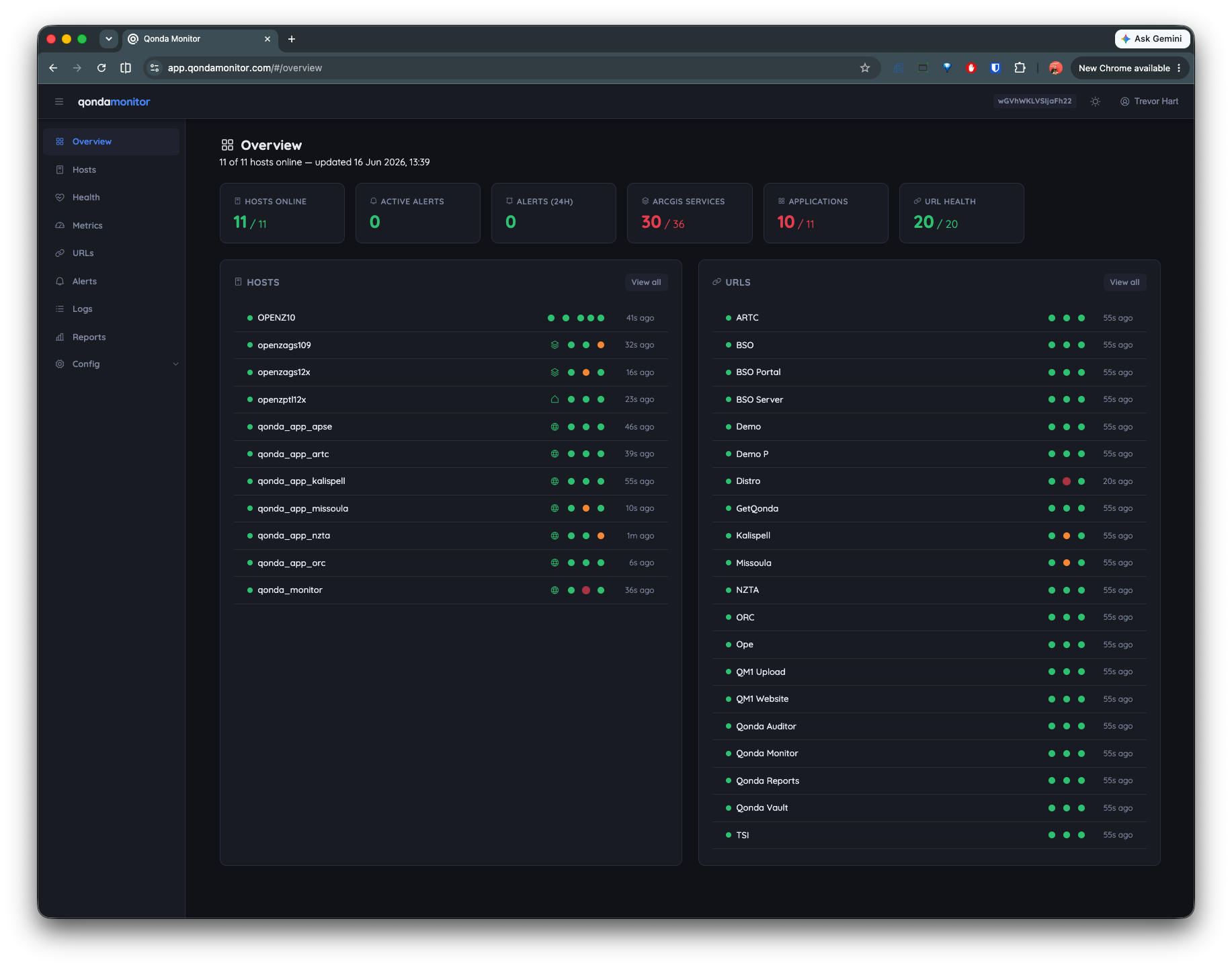
The all-in-one difference
All the monitoring. None of the plumbing.
Everything runs in one self-contained server. The databases are embedded in the server process — created automatically, no network ports, no credentials, nothing to install or patch. Agents push over HTTPS, so monitored hosts need no inbound firewall rules.
The first sign-in creates your admin account and hands you a pre-configured agent config to download. Sign in with built-in local accounts, ArcGIS Online or Enterprise OAuth, or ArcGIS Server credentials.
What you get
Everything your stack needs, in one place
From CPU and memory to ArcGIS service health and FME job analytics. One agent, full visibility.
Host health monitoring
CPU, memory, disk space, disk I/O (read/write KB/s and queue depth), and network metrics collected every 15–30 seconds. Stacked process charts break down resource usage by ArcGIS, Portal, DataStore, FME, and IIS separately so you can see exactly what is consuming your server.
FME Server and FME Flow monitoring
The only ArcGIS-focused monitoring product with native FME support. Track job execution time, CPU usage, features processed, and peak memory per workspace. Alert on failures or slow jobs before they impact production.
ArcGIS service health
Per-service health checks on every ArcGIS Server service — not just the server itself. Test info, layers, query, and export endpoints and track response times. Historical charts show exactly when a service went down and how often.
URL and SSL certificate monitoring
Poll any HTTP or HTTPS endpoint for availability, response time, and status code. Automatic SSL certificate expiry alerts. Monitor Web Adaptors, load balancers, REST endpoints, and third-party services from one dashboard.
ArcGIS request log analytics
Per-service analytics from ArcGIS Server request logs: average and maximum elapsed time, response size, and request volume over any time period. Identify slow services and track performance trends over weeks or months.
Smart alerting
Threshold-based alerts on CPU, memory, disk, health status, and URL availability. Email, Pushover push notifications, and webhook delivery for Slack, Teams, or any custom integration. Automatic offline detection without configuring individual rules.
Reports and charts
Pre-built reports for host health, service performance, URL uptime, and FME job analytics with flexible date ranges. Time-series charts auto-bucket data for clean rendering over any window from 30 minutes to 6 months.
Upgrades from the dashboard
The server updates itself in place — checksum-verified download, staged swap, automatic restart — from the admin page. Agents self-upgrade from their own local web interface. No remote desktop required.
vs popular monitoring solution
More monitoring, less cost
How Qonda Monitor compares where it matters most.
| Feature | Qonda Monitor | Well-known monitoring solution |
|---|---|---|
| Single-server install, embedded databases | ✓ | ×multi-component + external database |
| Zero-config first run | ✓ | × |
| FME Server and FME Flow monitoring | ✓ | × |
| Infrastructure monitoring | ✓ | ✓ |
| ArcGIS Server service monitoring | ✓ | ✓ |
| URL monitoring | ✓ | ✓ArcGIS REST endpoints only |
| SSL certificate expiry monitoring | ✓ | × |
| In-place upgrade from the dashboard | ✓ | × |
| Cost | Free (on-premise) | Per-core licence fee |
| SaaS option: hosted and managed | ✓ | × |
| ArcGIS OAuth sign-in (Online/Enterprise) | ✓ | × |
| ArcGIS Server account sign-in | ✓ | × |
| Automatic host offline detection | ✓ | ✓requires manual alert rules |
| Agent self-upgrade from browser | ✓ | × |
Getting started
Up and running in minutes
No databases to configure, no infrastructure to provision, no config files to edit.
Install the server
One installer on one Windows host. The service registers and starts itself — Java runtime included, databases created automatically.
Sign in
Your first login creates the admin account and hands you a pre-configured agent config to download. Or connect ArcGIS OAuth / ArcGIS Server sign-in.
Drop in the agents
Install the agent on each host and copy the downloaded config beside it. The agent auto-detects ArcGIS, FME, and IIS — data arrives inside a minute.
Pricing
Simple, predictable pricing
No per-core licensing. No surprise infrastructure costs. Self-host for free, or let Qonda manage everything for you.
- ✓ Unlimited hosts
- ✓ All features included
- ✓ FME and URL monitoring
- ✓ Embedded databases — nothing else to install
- ✓ 6-month retention, automatic backups
Includes all installers & instructions
- ✓ Everything in On-Premise
- ✓ Managed server and databases
- ✓ Automatic server updates
- ✓ No infrastructure to maintain
- ✓ Per-organisation subscription
Ready to stop finding out from your users?
Install Qonda Monitor in minutes and get full visibility across your ArcGIS Enterprise and FME infrastructure — for free.
Stuck or got a question?
Open an issue on GitHub — questions, bug reports, and feature requests all welcome.
Get in touch
Contact us
Questions about the product, pricing, or getting started? We'd love to hear from you.